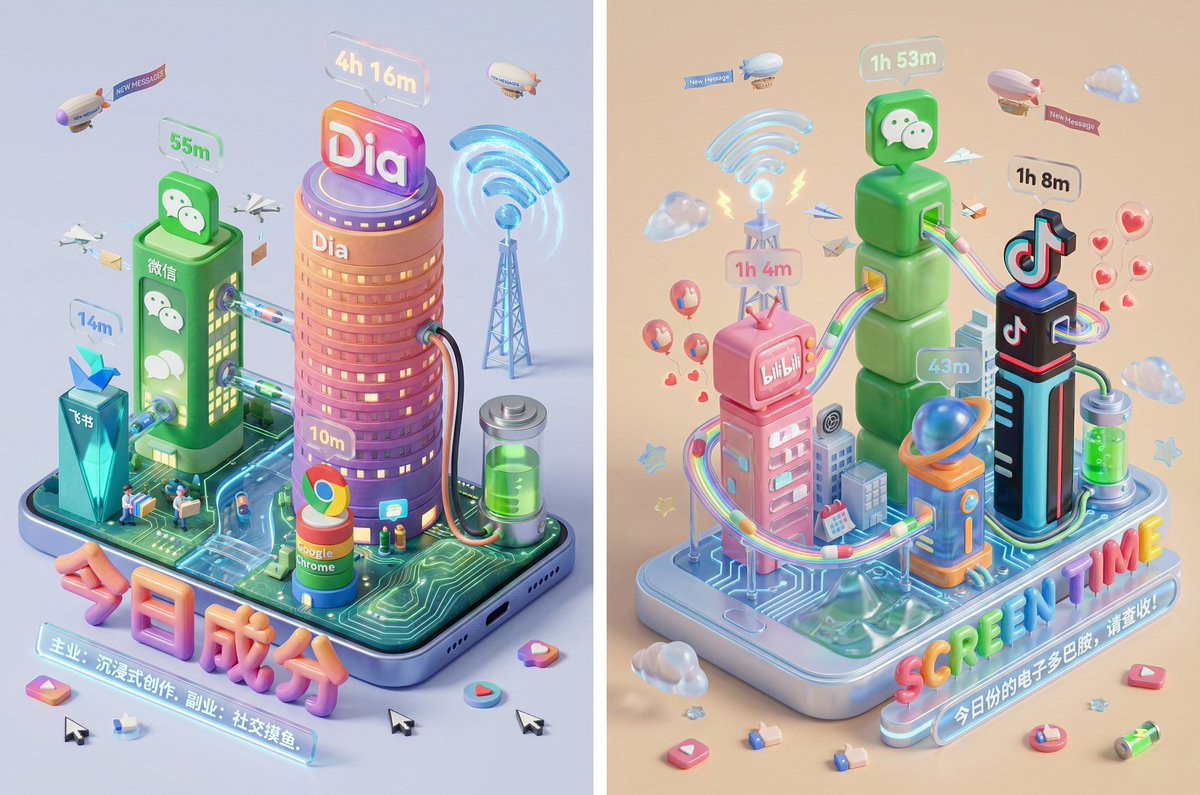
A highly detailed, multi-section Chinese prompt for Nano Banana Pro that visualizes the user's screen time data as a miniature digital town (Isometric City). The prompt dictates the style (Polymer Clay/Jelly Resin), the structure (building height corresponds to usage time), the city's ecosystem (data flow, NPCs like mail carriers and like-sprites), and the final rendering specifications.
提示词
Please read the user-uploaded [Screen Time Data Screenshot] and identify the top four APP names and icons. Retrieve information and icon styles for these APPs. Based on the tone of the APP combination (Social/Entertainment/Office/Comprehensive), independently decide on the core art style.

[2. Main Model Construction: Miniature Town Infrastructure] Construct a vibrant miniature digital town in the center of the screen, not just a display of buildings:

Smart Base (Foundation): A stylized mobile phone base. The surface is no longer flat but topographical (depending on the style, it could be rolling circuit board hills, glass water surfaces, or Lego baseplates).

Building Cluster (APP Embodiment): Skyscrapers representing the APPs.
Base: A cartoon-style smartphone base with rounded, frosted metal edges, and the screen surface emits a faint breathing light. The base is surrounded by floating, materialized 3D Emojis (clouds, stars, hearts) with a translucent jelly texture.
Building Cluster (APP Embodiment): Q-version skyscrapers stand on the island, representing the identified APPs.

Height Rule: Building height strictly corresponds to usage duration. The APP with the longest usage time is the tallest skyscraper, occupying the visual center.

Shape Rule: Extract the geometric features of the APP icons (e.g., circular icons become stacked spherical towers, square icons become rounded cube buildings).

Material: A mix of high-grade Frosted Polymer Clay and Translucent Jelly Resin. The surface should have delicate fingerprint textures and diffuse reflection gloss, like an expensive blind box toy.

Top Logo: The 3D logo of the App stands on the rooftop, with a texture like freshly baked, glossy candy.

Floating Time Card: A frosted glass-textured 3D bubble floats directly above the Logo. The bubble encapsulates three-dimensional, softly glowing numbers (corresponding to usage duration, such as "{argument name="usage duration" default="4h 12m"}").

Buildings should not be arranged in isolation but should form neighborhoods. Tall buildings are in the center (CBD area), surrounded by potentially low-rise system application buildings (Settings, Calendar, etc.).

[3. Urban Ecosystem and Interaction System (Urban Ecosystem & Interactions)] (Core Upgrade: Add “Interaction” and “Liveliness”) Please add rich dynamic details between the buildings to show how this “Digital Town” operates:

Traffic and Connection (The Data Flow):

Connection Method: Buildings must have physical connections.

Style Adaptation: If it's cyberpunk, use glowing fiber optic elevated bridges and maglev trains; if minimalist, use transparent glass pipes; if cute, use rainbow slides.

Vehicles and Transport: Pipes or roads must have flowing light points/capsules, representing data transmission.

Active “Data Sprites” (The Digital Citizens):

NPC Setting: Add tiny functional NPCs besides the main character figure.

Message Carriers: Near social APP buildings (like WeChat), flying paper airplane drones or small postmen carrying envelopes move in and out.

Like Sprites: Around video/community APP buildings (like Douyin/Xiaohongshu), glowing red hearts or thumb balloons float like fireflies.

Delivery/Shopping Riders: If Meituan/Taobao is present, there should be miniature riders or package conveyor belts connected to the main building where the protagonist is located.

Public Infrastructure (Public Utilities):

Wi-Fi Signal Tower: A glowing signal tower (shaped like a Wi-Fi icon) stands high in the town, broadcasting energy ripples across the city.

Battery Energy Station: A cylindrical energy tank (shaped like a battery icon) is located at the edge of the town, connected by thick cables to power the main building, where green liquid energy can even be seen sloshing.

Notification Airship: Small airships or clouds float in the air, hanging banners with “New Message” or “Red Dot.”

[4. Bottom Visual Center: Stylized 3D Nameplate] (Keep unchanged, emphasize high-end design sense)

Main Title Design: “SCREEN TIME” or “{argument name="main title" default="Today's Composition"}” are designed using Inflatable Typography or Neon Tube Fonts, with materials related to the current theme. They are not printed on paper but physically “stand” in the foreground of the image.

Decorative Details: Small 3D fragment elements (such as play buttons, like thumbs, battery icons) are scattered around the title, increasing the richness and trendy feel of the image.

Subtitle Copy: Below the 3D title, generate a floating glowing light strip with a short, sharp comment based on user data.

[5. Rendering and Photography (Tech Specs)]

Composition: Axonometric overhead view, emphasizing prosperity and order.

Details: Extremely rich Micro-details, making the viewer want to zoom in to see what the small figures are doing in every corner.

Keywords: Octane Render, C4D, Isometric City, Micro World, Living Ecosystem, 8k Resolution.