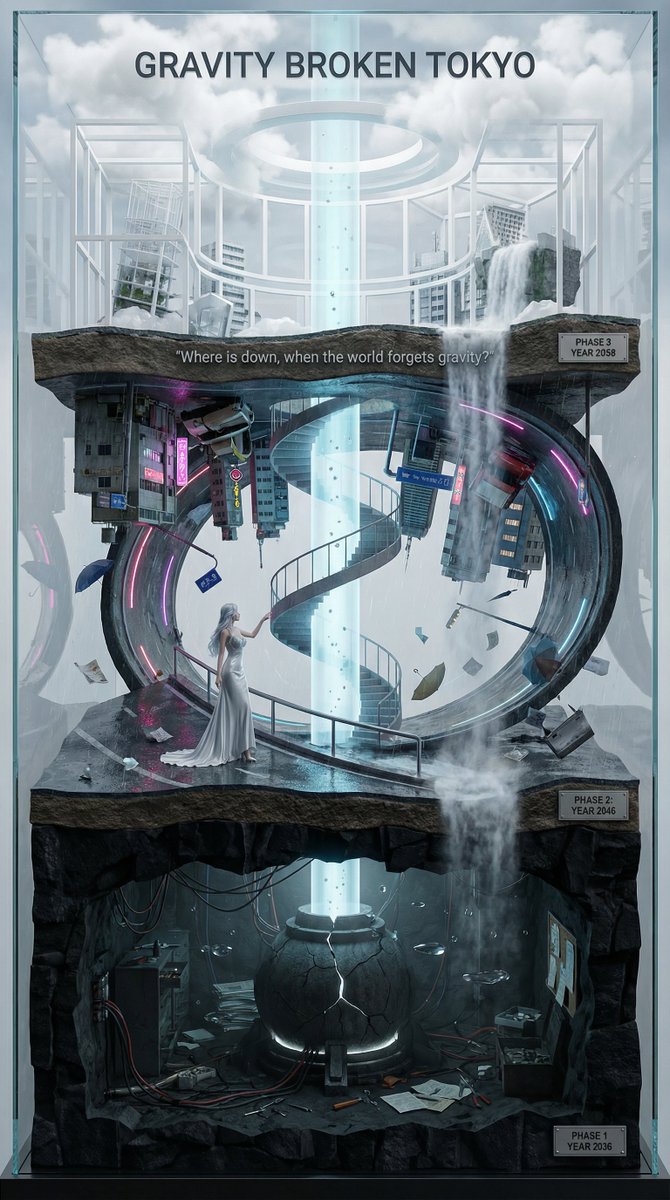
An extremely detailed meta-prompt for Nano Banana Pro (using Thinking Mode) combining 'Gravity Prompt' and 'Movie Vertical Miniature Prompt' to generate a complex, vertical, layered diorama visualization of a fictional sci-fi film titled 'GRAVITY BROKEN TOKYO'. The prompt specifies roles, steps, visual styles, gravity effects, and typography.
Prompt
You are an **architect and concept artist who visualizes story structures**.
Analyze the provided input text (the movie synopsis) and generate a **"Vertical Layered Diorama"** where the height direction represents the timeline.

The character in the attached reference image should be placed in the "Present (Middle Layer)" or "Future (Top Layer)" of this vertical structure, acting as the **storyteller/time traveler**, and posed to **look down on the past / look up at the future**.

---

## ▼ Instructions for Generation Process (Nano Banana Pro: Thinking Mode)

1. **[Step 1: Timeline Mapping]**: Decompose the synopsis into three time phases and assign them to physical layers.

   * **Bottom Layer (Past/Origin)**: Cause of gravity collapse, sealing, deep underground. Dark and heavy tone.
   * **Middle Layer (Present/Conflict)**: Survival and conflict in gravity-broken Tokyo. Vivid and dynamic tone.
   * **Top Layer (Future/Conclusion)**: Birth of a new gravity order, hope or ruin. Open and symbolic tone.
2. **[Step 2: Connection Design]**: Design the layers so they are not disconnected, but physically connected by elements such as **Gravity Well pillars / inverted spiral staircases / magnetic elevators / waterfalls where falling turns into rising**.
3. **[Step 3: Text Integration]**: Place the movie title in a stable location at the very top or bottom, and engrave famous lines on the **layer boundaries**.

---

## ▼ Design and Style Specification

* **Composition/Layout**: **Vertical Cross-section / Tower structure**. Aspect ratio is vertical (**9:16**). Viewpoint is **slightly above the front**, at an angle that shows the thickness and depth of the layers.
* **Taste**: **Precise museum model, geological cross-section, surreal architecture**. Express different eras and materials in each layer (concrete → neon metal → white structure on clouds) while integrating them as one giant object.
* **Texture/Image Quality**: Photorealistic, precise detail, **8k**. Raindrops, wet asphalt, reflections, fog, volumetric light.
* **Gravity Expression (Important)**:

  * Tokyo roads **curve 90 degrees as a continuous surface**, where the ground becomes a wall, and then arches to the ceiling, connecting in a **loop**.
  * Buildings, signs, cars, and pipes **protrude vertically** from the curved surface, and landmarks exist **upside down** suspended in the air.
  * Depict as a **physically continuous urban structure**, not just a reflection.
  * Light sources match the reality of a rainy night (reflections of neon and streetlights, diffused light through clouds).

---

## ▼ Input Text (Fictional Movie)

**Title**: **{argument name="Movie Title" default="GRAVITY BROKEN TOKYO (Gravity Fault City Tokyo)"}**
**Genre**: Sci-Fi Thriller / Disaster / Human Drama

**Synopsis**:
One night, due to the fracture of the "Gravity Lattice" above Tokyo, the city's gravity lost its uniformity. Roads bend into the sky, buildings lose their up and down, and falling chooses a direction. People survive by redefining "where the ground is." The narrator (reference character) dives across time to the origin of the gravity collapse, struggles in the current city, and reaches the new order of the future.

### [Bottom Layer / Past and Origin] (PHASE 1: YEAR 2036)

* **Setting**: Deep underground research complex. Black basalt-like strata, old wiring, gravity control reactor "Atlas Core."
* **Description**: Suggests that the device meant to "fix" gravity instead triggered the "tearing" of gravity. Tools and paper documents are scattered on the floor, and water droplets float horizontally due to gravity disturbances.
* **Tone**: Dark, oppressive. Warning lights, fine dust, the stillness of low gravity.

### [Middle Layer / Present and Conflict] (PHASE 2: YEAR 2046)

* **Setting**: The center of gravity-broken Tokyo, where rain continues to fall. A continuous city where **wet asphalt curves 90 degrees, becoming a wall, and continuing to the ceiling**.
* **Description (Reflecting Gravity Prompt)**:

  * Roads rise vertically and then arch overhead to loop.
  * Landmarks are suspended upside down, and road signs protrude into the air.
  * Neon lights bleed along the curved surfaces in the fog and light rain, and reflections establish the light of a real rainy night.
* **Character Placement**: Place the reference character in the **"Present" of the Middle Layer**. Grasping a railing or pipe with one hand, pointing to the light of the upper layer with the other. Gaze **looking down on the past (bottom layer) while looking up at the future (top layer)**.
* **Tone**: Dynamic, tense. People's evacuation routes continue along the "wall roads."

### [Top Layer / Future and Conclusion] (PHASE 3: YEAR 2058)

* **Setting**: The "Stable Gravity Layer" above the clouds. City remnants are rearranged, forming a new residential area composed of white frame structures and transparent materials.
* **Description**: Ambiguous whether the gravity lattice was "repaired" or if a "new direction" was accepted. A pale column of light from the gravity well extends into the sky, connecting to the darkness below.
* **Tone**: Open and symbolic. Hope and unease coexist.

---

## ▼ Connection Points (Gimmicks connecting the layers: Required)

* **Gravity Well Light Column**: A column of pale blue volumetric light penetrating from the core of the bottom layer to the top layer. Particles flow upward.
* **Inverted Spiral Staircase**: "Up" and "down" switch midway. Small year plates on the staircase railing.
* **Waterfall where Falling Turns into Rising**: The water flow reverses at the boundary, emphasizing the layer separation.

---

## ▼ Visual Elements (Motifs to emphasize)

* Wet asphalt, trajectory of raindrops, neon reflections, fog, volumetric light.
* Curved City: Roads, architecture, and signs bend as a **continuous surface**, forming a **physical loop**.
* Small objects floating in the air (umbrellas, paper scraps, tools, petals) visualize the disturbance in the direction of gravity.
* Material changes in each layer: Rough rock stratum underground → Wet concrete and metal in the present → White structure and transparent material in the future.

---

## ▼ Text Instructions (On-screen Typography)

* **Title**: "**{argument name="Title" default="GRAVITY BROKEN TOKYO"}**"

  * Placement: **Sky of the Top Layer**, or engraved on the pedestal of the bottom layer.
  * Font: Inorganic sans-serif, movie poster style.
* **Famous Line** (Engrave on layer boundaries):

  * `{argument name="Famous Line" default=""Where is down, when the world forgets gravity?""}`
  * Placement: **Boundary between Middle and Top Layers**, like a sculpture on the landing of the inverted staircase or the edge of the light column.
* **Timeline Display (Optional)**: Small next to each layer

  * `PHASE 1 / YEAR 2036`
  * `PHASE 2 / YEAR 2046`
  * `PHAS